#TwoMinuteTeardown: Ubiquiti SFP Wizard
Two Minute Teardown: Ubiquiti SFP Wizard
To make a long story short, I allocated a few hours to build a tool that can read/write the SFP module’s EEPROM. I then wired this up to a logic analyzer and compared the read/write operations to what the SFP Wizard does when it tries to unlock a module.
TL;DR:
- I didn’t see a meaningful difference in what my tool read from an EEPROM compared to the SFP Wizard.
- Version 1.0.5 is the only firmware version that does not give me a “failed, locked” error when I try to write… But it’s also the only version that just keeps trying to write despite despite the fact that bytes are not changing on the EEPROM.
- The assessment here is correct; there’s no value in downgrading. In fact, it’s (slightly) cheaper to buy a basic USB <-> I2C adapter and use my tool (which lets you try any arbitrary password) than it is to buy a SFP Wizard. The Wizard is a hell of a lot more polished, though.
Details are below. but I wanted to put this up at the very top for visibility.
If you have a SFP Wizard running Firmware version 1.0.5, DO NOT update it.
If you have a COPY of the 1.0.5 OTA file, please keep it safe and get in touch with me.
Some work has been done to understand precisely what changed between early FW versions and the more recent FW versions that have crippled the device’s ability to program arbitrary SFP modules.
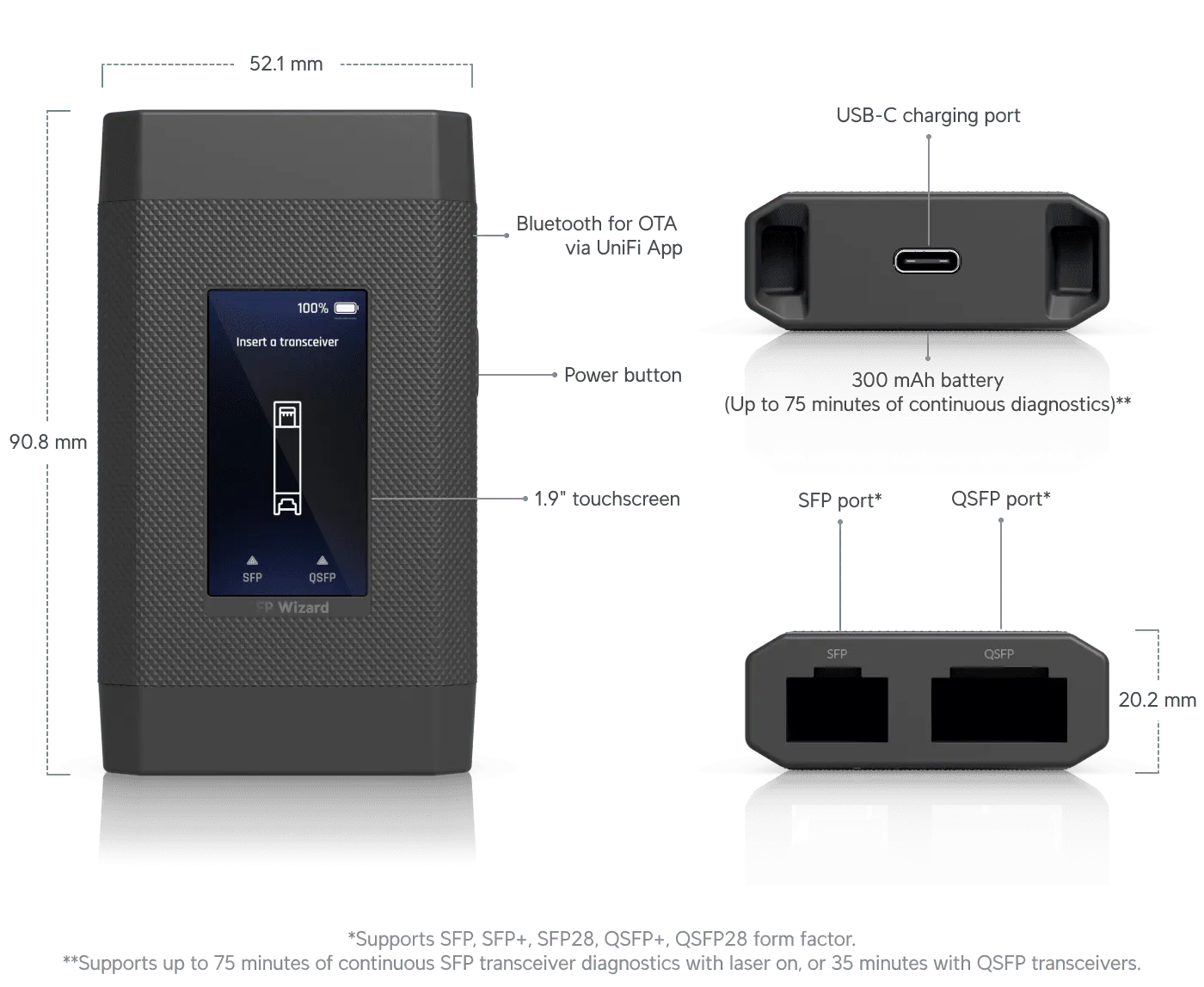
SFP modules interface to their host over what is essentially a low speed i2c interface and a few high-speed differential pairs.
Devices that can interrogate and re-program the SFP modules have been around for a while but they are either niche, esoteric, expensive, or all of the above.
People have been hacking on these things for a while:
- Writing protected SFP / QSFP / XFP and searching password (brute force method) - REVELTRONICS
- GitHub - hfuller/transceiver-notes: Notes about hacking, programming, and otherwise dinking with SFPs and other optical transceivers.
- GitHub - SloMusti/sfpddm: Arduino library for interfacing SFP modules and reading DDM information as per SFF-8472
- Read SFP I2C via CH341a Programmer – HITOHA.もえ
- sfp-experimenter
The Ubiquiti SFP Wizard is a new entrant to the market.
This is not a review. The packaging is plain recycled (?) cardboard with white ink; it doesn’t photograph well so this is also not an unboxing.
Teardown
This thing is a massive pain in the ass to open. I swear, somebody on the design team must be an investor in a glue factory.
The device is made up of an inner frame which holds the electronics. Two “structural” caps are attached to the midframe with glue ans screws. The outer case / panels snap to this midframe and there are two decorative “trim” caps that complete the exterior.
Virtually everything has at least some glue on it.
Anyways, start with the trim cap on the SFP module side. You will then want to begin gently trying to pry the back half of the case away from the front half. Once the clips along the side are undone, there’s one more clip that holds the back panel to the midframe.
You’ll need a bright light and a long-neck screwdriver to hit it, but if you look through the gap between the two sfp module bays you should be able to see the tab.
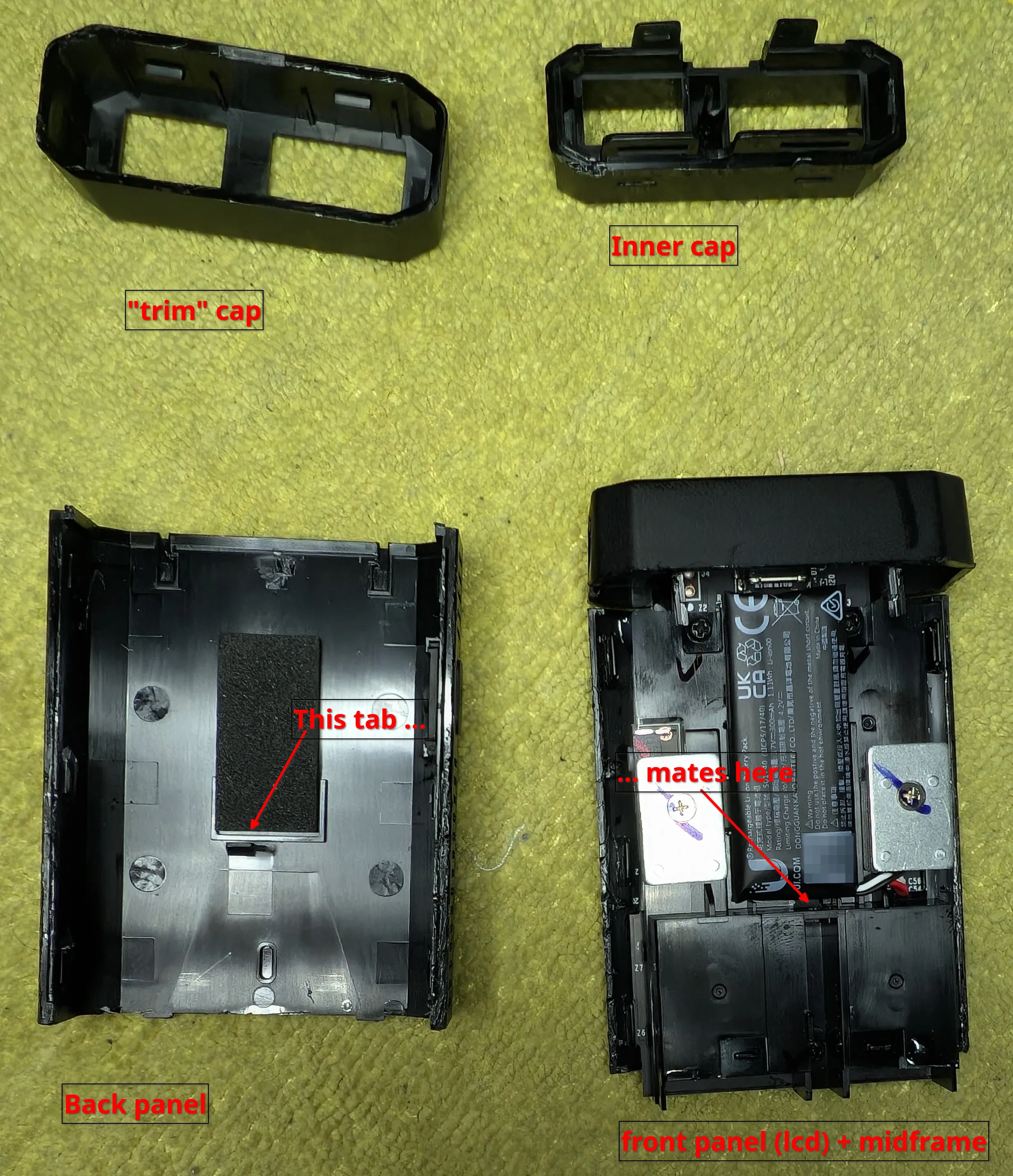
Instead of weights to make the thing feel more premium in the hand, how about a bigger battery that’s also user-replaceable!?
The LCD is heat-staked into the front panel.
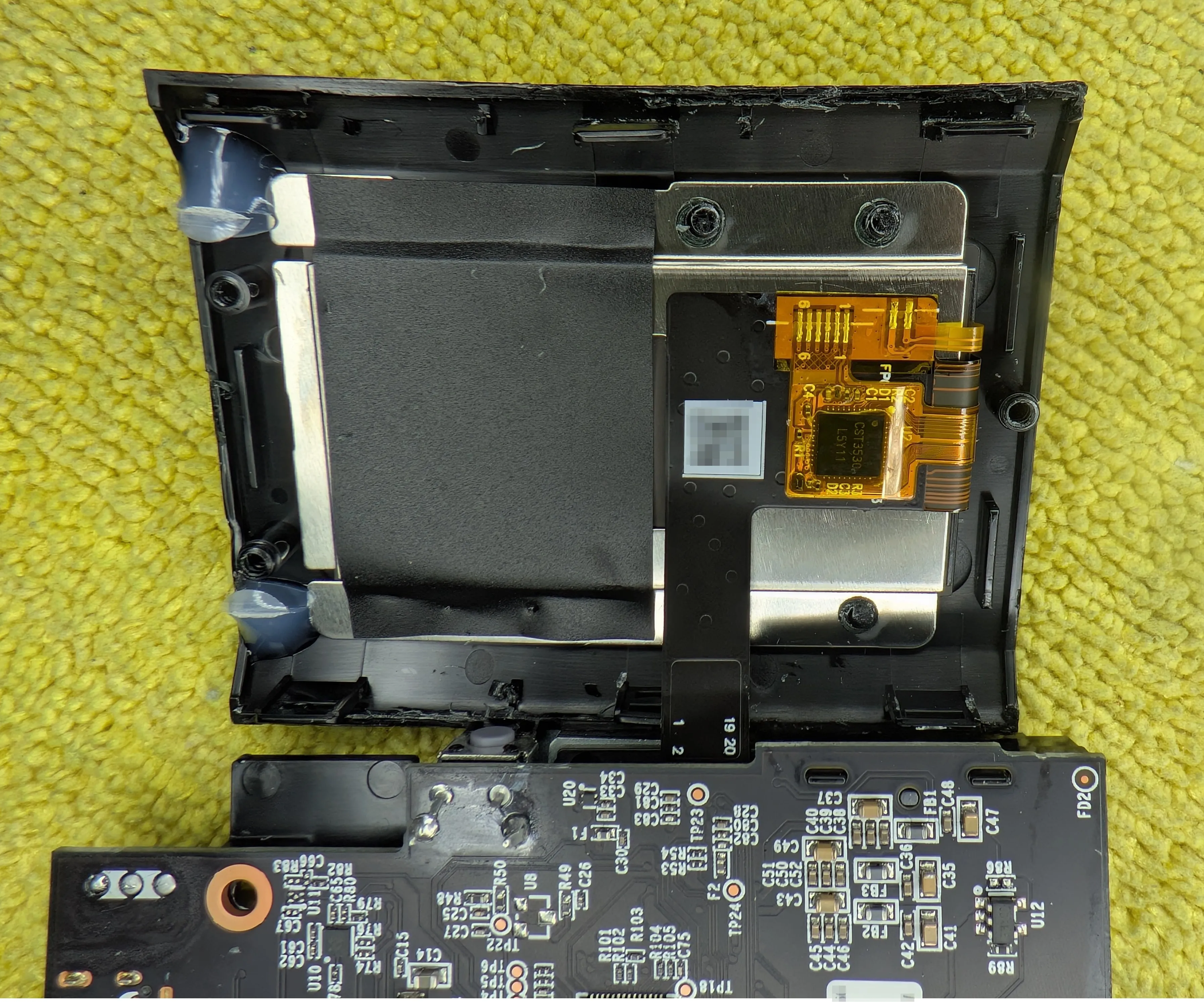
Yep, it’s an ESP32. Not expected … but welcome!
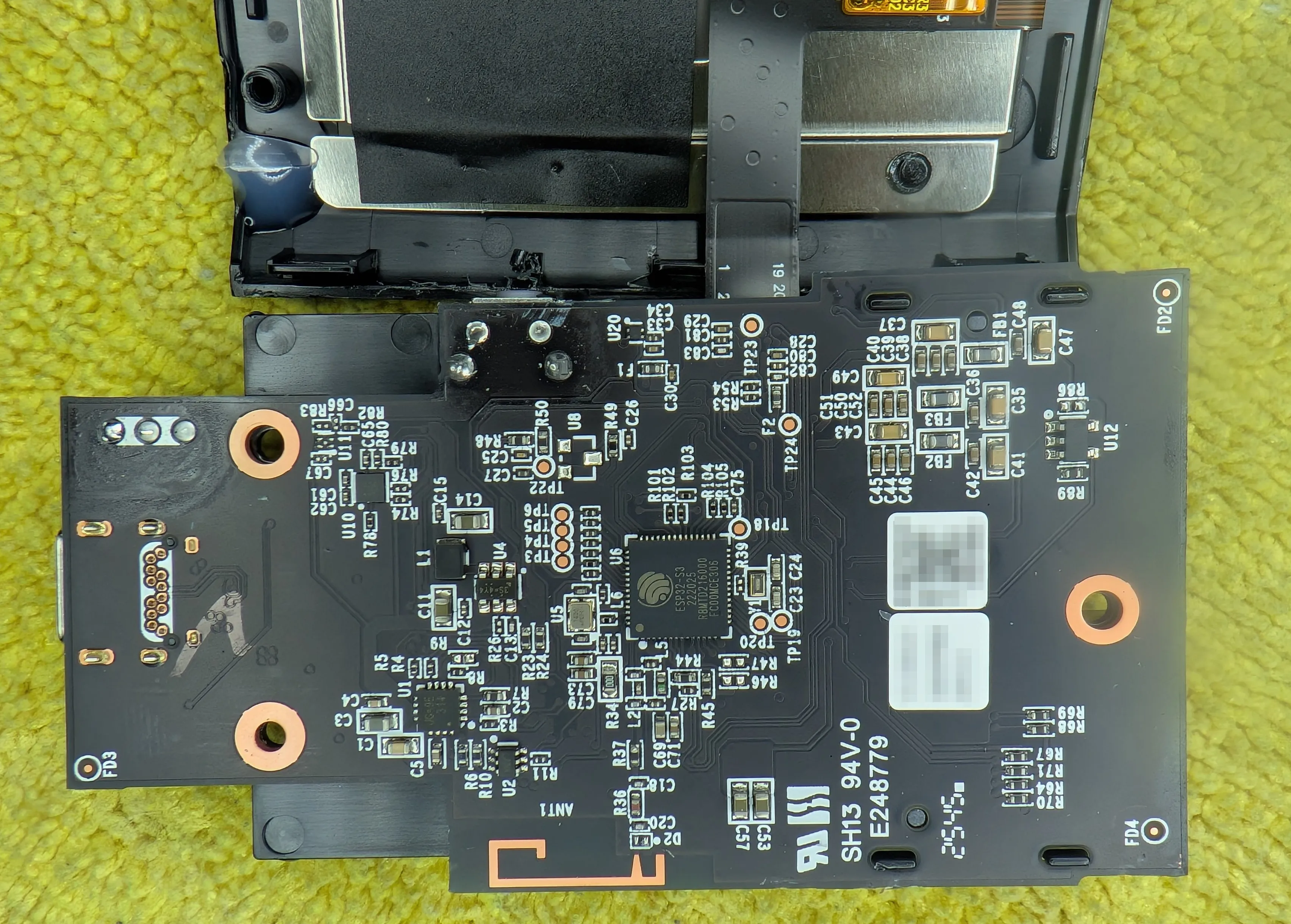
Yep, ESP32 inside. I did not have that on my bingo card!
There’s a few more interesting things on the underside of the board… including a few headers that are almost certainly for programming/debugging.

That USB-C Port is not going anywhere!
That’s about it! Once you manage to get in, it’s a pretty simple device.
misc
As soon as I saw the ESP32, I had to see if the USB-C port was connected to it (or just for power). Yep, it’s wired up as a USB device:
| |
I wasn’t able to use just esptool to reboot into bootloader mode and I didn’t look for boot0 pins so no attempt to dump the firmware was made.
If they didn’t trigger any of the eFuse features, this thing could end up being a nice little SFP programmer for hobbyists that want to hack on SFPs beyond what the Ubiquiti stock firmware allows.
Do not update firmware above 1.1.0. Apparently the device can no-longer flash arbitrary modules after updating.
It’s not clear if that’s a mistake or they caved to some pressure from the SFP module manufacturers.
Other ICs
Winbond 25Q256JVFQ. This is almost certainly for storing all the SFP module “profiles” that the device supports.
There’s a TI part labeled
PD534 2CKG4 A49Dwhich is likely a PCA9534A which is an IO expander. I have absolutely no idea what it’s being used for in this design… the ESP32 has plenty of GPIOs available.
Update: some news on the ESP32 side of things
Briefly:
- We have tooling to fetch the OTA images from the source, they can be analyzed with standard reverse engineering tools.
- Very early firmware versions (1.0.5) appear to have been removed from the server :(
- The OTA images can be flashed to the device to downgrade or upgrade the firmware
- The ESP32 has security features enabled that prevent dumping the full flash contents or modifying the bootloader/application images without bricking the device.
Tooling
There have been two attempts at reverse engineering the firmware and making this tool a bit more useful than the stock Ubiquiti firmware.
josiah-nelson/SFPLiberate: I have not tried this tool yet but it does seem to be very vibe-coded and does not appear to be as accurate/technically correct as the other tool below.
vitaminmoo/sfpw-tool: this is a simpler
gobased tool that I have used and does work with my SFP Wizard.
Between the two projects, there are some interesting details about the API. After skimming, it appears that the app talks to the device over a custom-ish protocol that is heavily inspired by HTTP/REST principles. Given that this thing has an ESP32 inside, I can’t help but wonder if there was ever a plan to have WiFi connectivity in this thing at some point.
ESP32 Security
Above, I mentioned that I was not able to dump the firmware using esptool.
As it turns out, this is effectively because Ubiquiti has enabled some of the ESP32’s security features and locked down the chip.
It is only possible to (partially) interact with the bootROM very early on in the boot process but it is possible.
From the powered off state, you have about 700ms to
- press the power button
- plug the USB cable in
- run
esptool
If you’re too slow, dmesg will show something like this:
| |
If you do get the timing right, you will get something like this:
| |
When you use the sfpw-tool to pull down the exiting firmware and then analyze them, you’ll see output like this:
| |
Not pictured here, but strings on the bin file shows that it’s plain-text.
This means that:
- The OTA firmware files are ‘plain text’
.binfiles that can be analyzed with standard ESP32 tooling but they do not contain the entire firmware image; they are effectively just a partition image rather than an image of the full flash. - The ESP32 will not permit any of the usual/easy methods of dumping out the rest of the flash partitions.
- The ESP32 has a single key burned into eFuses (the other slots are disabled; you can’t add new keys!)
- The content of the flash is encrypted, transparently to the user, using that key and this cannot be disabled.
- Secure boot is enabled and the bootloader is immutable. If you change the bootloader, the hash will not match and the ROM will not jump to it.
- The bootloader (presumably) has a key baked into it that is used to verify the signature of the application firmware before jumping to it.
Or, put another way: OTA firmware files can be analyzed but are incomplete. Attempts to change the image files and flash them back to the device will - at best - not work. At worst, they will brick the device. This also goes for attempts to dump the full flash contents; Ubiquiti have locked this thing down pretty well.
Early revisions of the ESP32 had various exploits but it’s not clear if those still apply to the S3 variant used here.
Above, it looks like the chip in my unit was manufactured 222025 which is either mid-year 2022 or 2025 (probably) so it’s not ancient and likely has the latest silicon fixes.
I would love to be proven wrong here!
Did they cripple the device on purpose?
The author behind sfpw-tool reached out to me to share some additional details about the reverse engineering work that has been done on the firmware. Specifically, comparing the code-flow between the old firmware vs new firmware w/r/t passwords for locked SFP modules.
The newer flow just tries the specific entries that match the model that is inserted, and if those don’t work it tries the single default. The old one tried the first match by model, then fell back to trying each unique one from the db.
My tool has a command that auto-dumps the password database from firmware files directly, which is the other reason I’m looking for an old version.
I’m not sure what to make of this. There are many lists of SFP module passwords floating around the internet so it’s not like this is a secret.
The SFPWizard wasn’t even the first device on the market that could program locked SFP modules so it’s not like Ubiquiti were breaking new ground here.
I do not know if they got a nasty letter from some industry group / company and they changed how the device works in response or if it was a genuine mistake / they didn’t intend to offer similar functionality to existing devices on the market.
Regardless, if you have a valid/signed 1.0.5 OTA firmware file, please keep it safe and get in touch with me. That file can be used to downgrade the device and restore its “at launch” functionality.